Ownership
Your data, your infrastructure
Documents, templates, and full revision history live on your servers. No vendor lock-in, no shared tenancy, no external dependencies on your data.
Eliminate version chaos. Build documents you can actually trust.
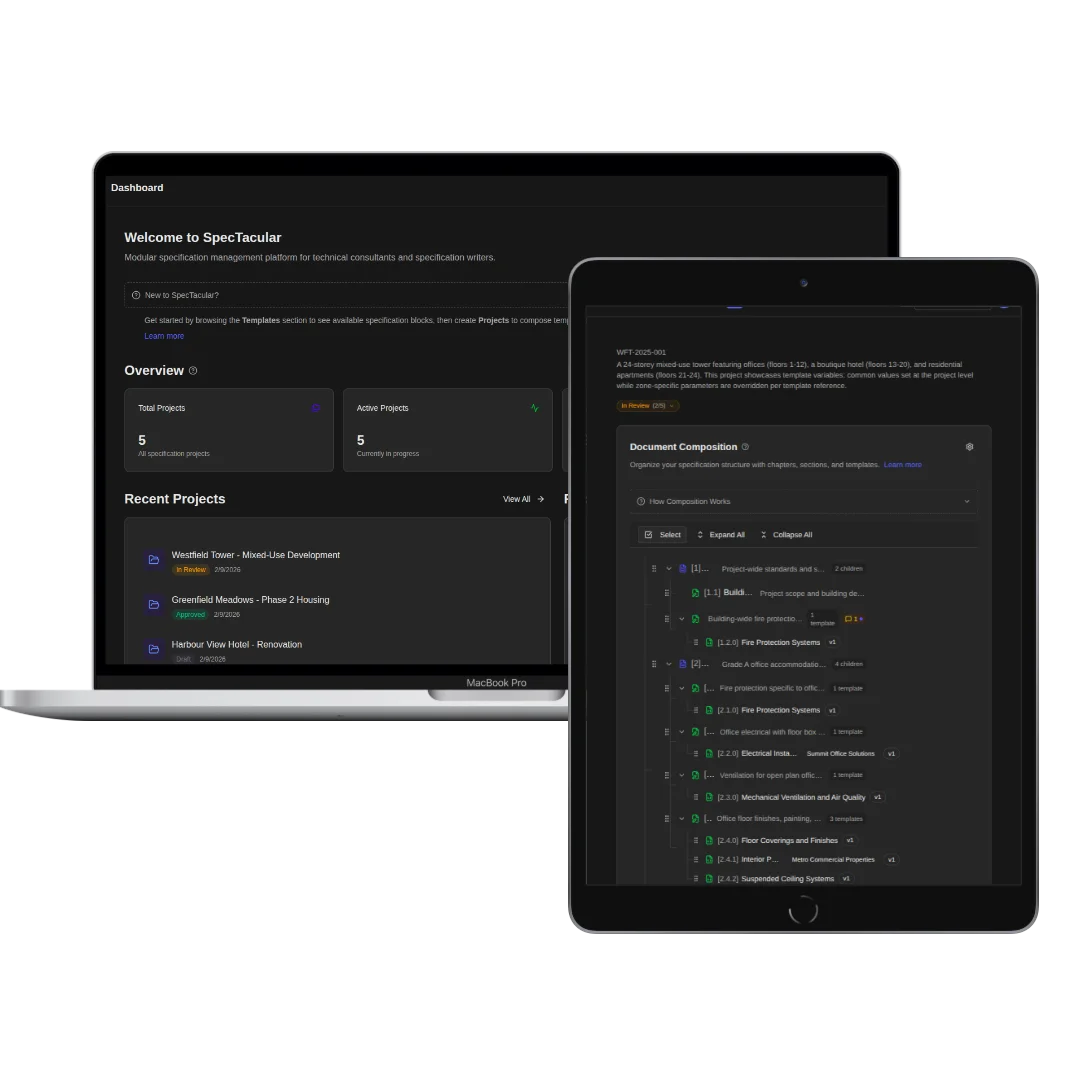
SpecTacular is a document composition platform that lets teams build complex specifications from reusable, version-controlled template blocks. Designed for engineering, construction, maritime, and infrastructure teams where documentation accuracy is critical to delivery.
Documents, templates, and full revision history live on your servers. No vendor lock-in, no shared tenancy, no external dependencies on your data.
Maintain a revisioned library of templates with visual side-by-side comparisons between any two versions. See exactly what changed, when, and why.
Deviate from standard templates in a controlled way. Variants let you make sanctioned modifications without forking an entirely separate template.
Define configurable parameters within templates to handle project-specific differences. One template serves many projects, no dedicated snowflake copies needed.
Share specific sections for online review with precise access control. Decide who sees which parts, who can comment, and whether reviewers see each other's feedback.
When a template is updated, you decide whether each existing project document adopts the change. Updates are deliberate, never automatic.
Assemble project documents by dragging and dropping template sections into place. See the structure take shape as you build it.
Capture point-in-time snapshots of entire projects with full change history. Compare any two snapshots side by side to see exactly what evolved.
Generate consistent PDF output with custom formatting, branding, and layout options. What you compose is what gets delivered.
“After years of managing technical specifications in complex projects, seeing how often outdated documents and inconsistent standards caused real issues, a better approach became necessary. This is that approach.”
Capture your standards in a library of templates. Organize by category, add tags, create variants for different contexts. Every template tracks its own version history independently.
“I went into the demo thinking it would be another standard document management tool. Then I saw how templates compose into full specs with version tracking on both levels. That's a different thing entirely.”
“The reviewer workflow looks great. Low friction to set up, and reviewer comments have clear statuses, so they are easy to track. No more getting lost in red-lined documents and email threads.”
“Using template variants where client-specific deviations from company standards come into play is really clever. Many companies lose sight of what their standards actually are, and inherited specs become the norm.”
“Template variables are a standout feature. At first I didn't get it, but seeing it in action, it really clicked!”
“The AI-assisted template analysis using a locally running AI system was a very cool feature. This is how you leverage AI in a smart way, without fear of privacy violations.”
“Update a clause once, every project using it gets flagged. I immediately saw how that would change our compliance workflow.”
“Being able to reliably manage updates to a spec as a project develops is a big win. As-built specs are typically a real pain and I can see this making life a lot easier on that front.”
“I went into the demo thinking it would be another standard document management tool. Then I saw how templates compose into full specs with version tracking on both levels. That's a different thing entirely.”
“The reviewer workflow looks great. Low friction to set up, and reviewer comments have clear statuses, so they are easy to track. No more getting lost in red-lined documents and email threads.”
“Using template variants where client-specific deviations from company standards come into play is really clever. Many companies lose sight of what their standards actually are, and inherited specs become the norm.”
“Template variables are a standout feature. At first I didn't get it, but seeing it in action, it really clicked!”
“The AI-assisted template analysis using a locally running AI system was a very cool feature. This is how you leverage AI in a smart way, without fear of privacy violations.”
“Update a clause once, every project using it gets flagged. I immediately saw how that would change our compliance workflow.”
“Being able to reliably manage updates to a spec as a project develops is a big win. As-built specs are typically a real pain and I can see this making life a lot easier on that front.”
Run on your own infrastructure. A flat monthly rate plus usage-based tiers.
We handle the infrastructure. A flat monthly rate plus usage-based tiers.
The luxury yachtbuilding industry runs on its specifications. Every hull, system, and finish is defined in documents that shape the entire design and build process. Yet the tooling for managing those documents has barely evolved. SpecTacular was born from that gap, borrowing from software development practices to give specification management the tools it deserves. The spec-related name stuck, but the product outgrew its origins...as the same approach works for almost any composable document, not just specs.
Any business that finds itself repeatedly creating larger documents that could be broken down in to a library of re-usable standardized sections: technical specifications, proposals, contracts, policies, compliance documents, product manuals. If you find yourself copying sections from previous projects, SpecTacular will save you time.
Template Variables. Define placeholders directly in your template text, things like client name, project reference, site address, or any detail that changes between projects. When you add that template to a project, you set the variable values once at the project level. Every section that references those variables fills in automatically. The template itself stays unchanged in your library, so there's no need to save separate copies for different clients or contexts. If a variable value changes mid-project, update it in one place and it propagates everywhere that template is used. You get one canonical template that adapts to each project without duplicating anything.
Word processors and document management systems treat documents as single files, and revisions are new files. SpecTacular treats them as managed compositions of versioned blocks. You can granularly create standards and compose them into specifications, rolling out updates to your composed documents as you go, with full change tracking at template and project level. No more lost revisions or invisible scope creep.
You can build your template library from existing documents in a few ways. The most common approach is to take your best existing documents and break them into reusable sections: identify the parts that repeat across projects, paste them into templates, and tag them by category. Most teams find their documents already have a natural structure that maps well to template blocks. If you have a large backlog or complex formatting to preserve, we can help with that migration directly, setting up your library structure, importing content, and configuring your categories so you're working with a complete library from day one rather than building it piecemeal.
You create a review link with an expiration date and send it to your reviewer. They open the link in their browser, no account creation or login required. From there, they can read the document and, if you've enabled commenting for that link, leave comments directly on individual sections. Each comment has a status (open, addressed, resolved) so both sides can track what's been dealt with and what's still outstanding. You control the scope: reviewers only see the specific document you shared, not your full project or template library. You can create multiple review links for the same document with different permissions, so one stakeholder might have comment access while another has read-only.
Yes. You can create multiple PDF export presets, each with its own typography, page layout, color scheme, and branding. A preset controls everything from fonts and heading styles to header/footer content, logo placement, and margin spacing. Teams typically set up presets for different audiences or document types: one for client-facing proposals with full branding, another for internal technical specs with denser formatting, and so on. When you export, you pick the preset and generate the PDF. If your branding changes, update the preset once and every future export uses the new styles automatically. You can also export documents as static websites for browser-based distribution.
Yes. SpecTacular runs on your own infrastructure. Your data stays on your servers. We also offer managed hosting for teams who prefer not to maintain infrastructure.
SpecTacular includes an AI assistant that you activate by connecting any OpenAI-compatible endpoint, whether that's OpenAI directly, a local model running on your own hardware, or another provider that supports the same API format. Once connected, the assistant can help with drafting new template content, summarizing sections, and suggesting edits within the document editor. Because you choose the endpoint, teams with strict data policies can run a local model and keep all content on their own network. The AI features are optional and the product works fully without them. Nothing is sent to any external service unless you explicitly configure it.
The best way to understand SpecTacular is to see it applied to real-world documents.